
Officers send announcements ("Ansagen") to the whole guild: shown big on screen, with a sound. And you decide where each kind of pop-up notice appears on your screen, how big it is and which sound it plays.
Announcements
An announcement is a large blue notice at the top of the screen, plus a sound and a chat line. It stays for 20 seconds.
- In the guild window the current announcement is shown for up to 2 hours as a blue bar above the member list ("Ansage von … (vor … Min.)" – announcement from … (… min ago)).
- Anyone logging in during that time receives it afterwards – provided an officer with the addon is online to pass it on.
- Announcements are only accepted if the sender is an officer by guild rank.
Sending one (officers only): the Ansage button at the bottom of the guild window, or /sigrid ansage <text>. Up to about 160 characters.
Deleting one (officers only): Einstellungen → Offiziere → "Letzte Ansagen" (recent announcements) → Löschen (delete). This applies to everyone – people who log in later won't get it either. More on For officers.
Notices
The addon reports many things as small notices (a panel that slides in and fades after a few seconds). The top right corner sometimes says what a click does, e.g. "Klick: Gratz" (click: congratulate) or "Klick: Karte" (click: map). A click always closes the notice.
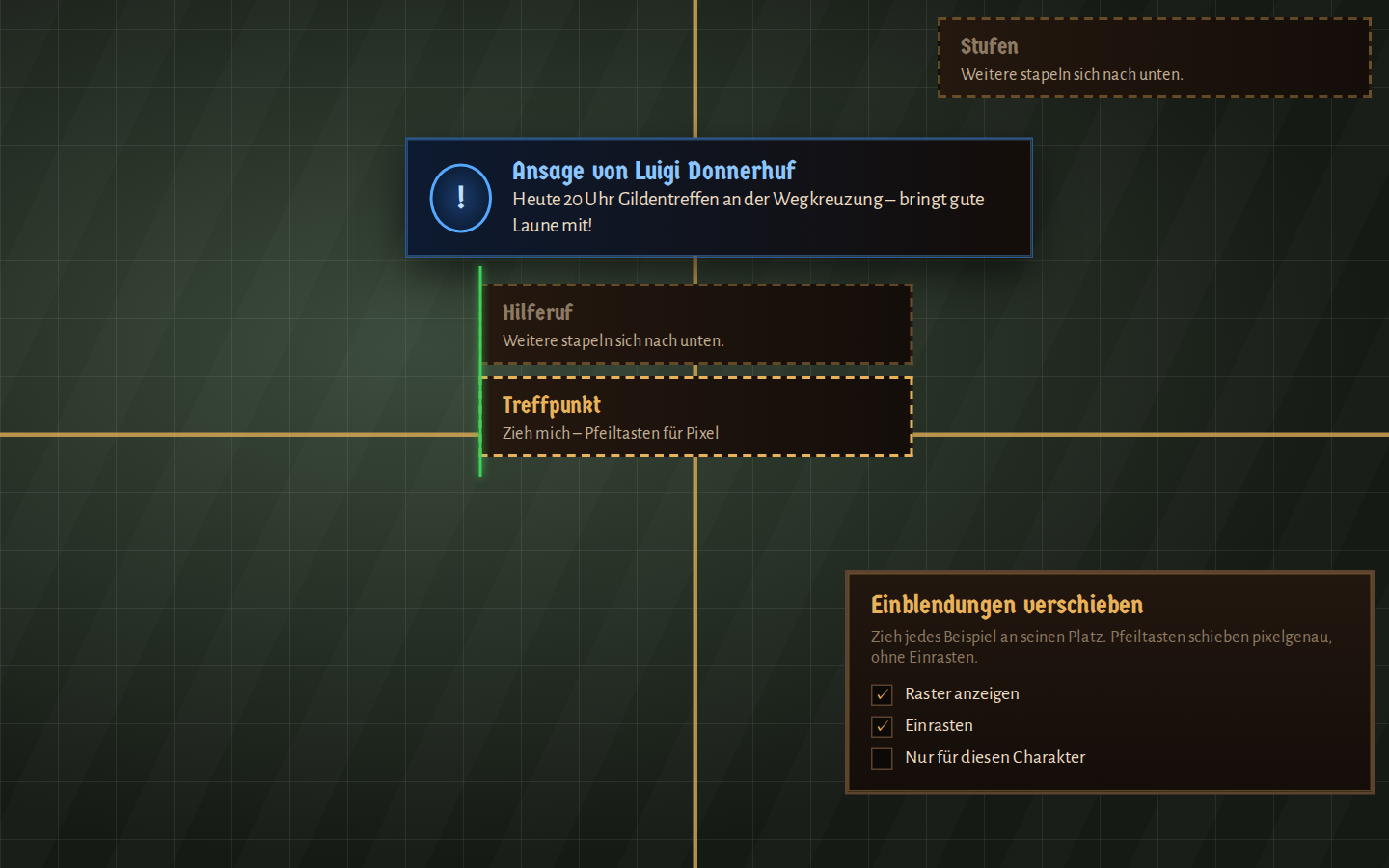
There are four groups, each with its own position and size. Each group shows at most 3 notices stacked.
| Group | Default position | What appears there |
|---|---|---|
| Ansage (announcement) | top centre | announcements, boss kill celebration |
| Hilferuf (call for help) | top centre, below | calls for help |
| Treffpunkt (meeting point) | top right | meeting point, group finder, campfires, mentor, "Willkommen zurück" (welcome back) |
| Stufen (levels) | very top right | level-ups, guild achievements, congratulations, anniversaries, weekly stats, bounty, treasure hunt |
Moving notices
- Einstellungen → Darstellung → Einblendungen verschieben (move notices), or
/sigrid verschieben. - The guild window closes and a sample appears for each group.
- Drag a sample to where you want it. Click selects it.
- Use the slider to set the size of the selected sample (80–130 %).
- Arrow keys nudge the selected sample pixel by pixel, with Shift by 10 pixels (no snapping).
- Fertig (done) or Esc saves.
The move window also has:
- Nur für diesen Charakter (only for this character) – positions and sizes apply only to the character you are playing.
- Raster anzeigen (show grid, default off) – a helper grid across the screen, centre lines thicker.
- Einrasten (snap, default on) – when you let go, a notice snaps to other notices and to the screen centre if it is close enough. A green line shows what it snapped to.
- Zurücksetzen (reset) – everything back to default.
Groups in the upper half of the screen stack new notices downwards, groups in the lower half upwards.
Note: Move mode is not available in combat, and entering combat closes it.
Sounds
Einstellungen → Meldungen & Töne → Töne: pick a sound for Hilferuf (call for help), Ansage (announcement), Stufenaufstieg (level-up) and Stufe 60 (level 60), each with ▶ to preview, or "Aus" (off). "Alle Addon-Töne aus" mutes everything. Which events use which sound is listed on Settings.
Switching notices off
Every kind can be switched off on its own: under Einstellungen → Meldungen & Töne (level-ups, calls for help, guild achievements, anniversaries, weekly stats) and Einstellungen → Gemeinschaft (group searches, boss kill celebration, campfires). Officer announcements cannot be switched off – only their sound.
Found a bug or have an idea? Report it here (English is fine)