
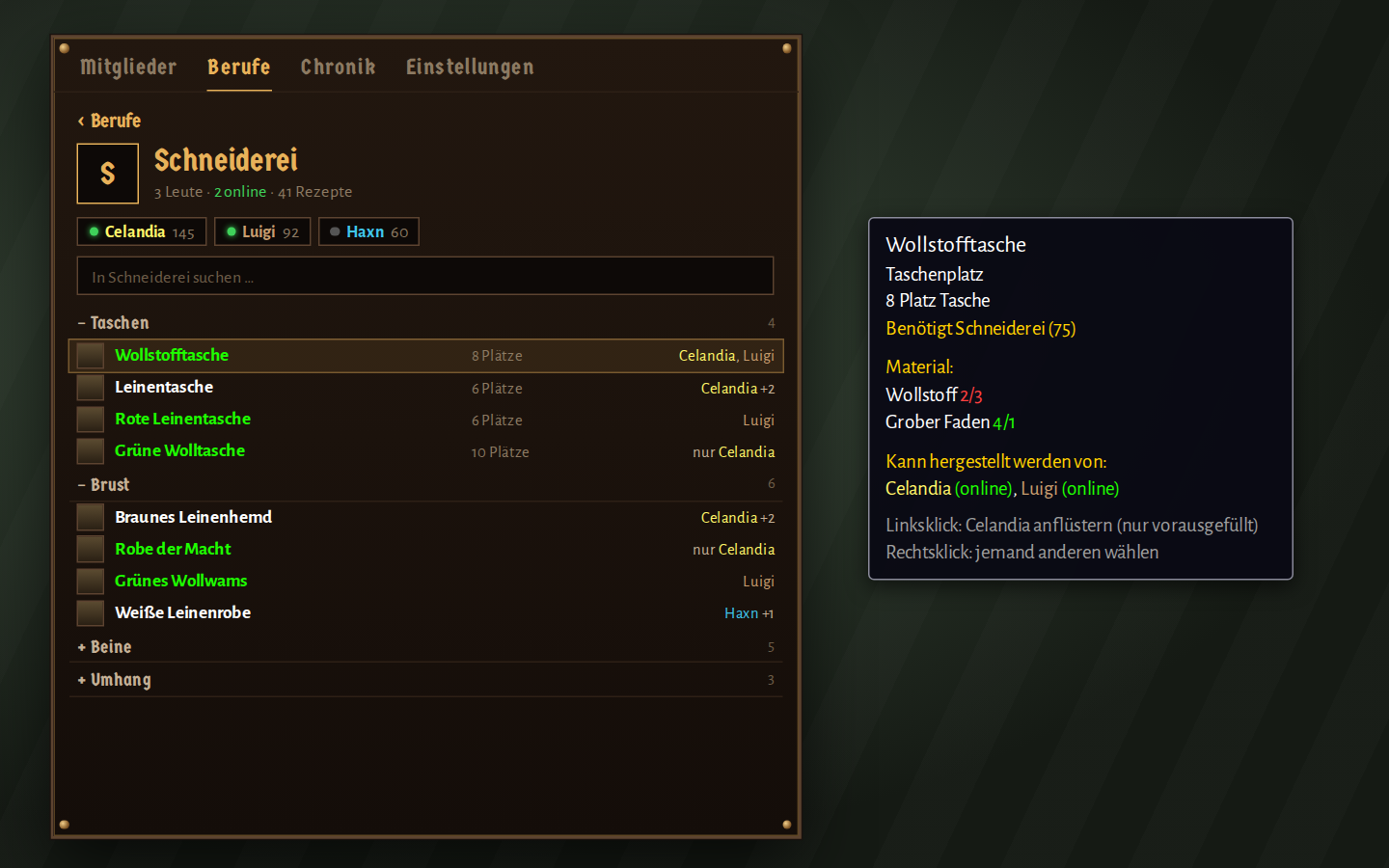
Who can craft this for me? The "Berufe" (professions) tab shows every profession in the guild as its own page: the people and their skill at the top, all recipes below, grouped by slot.
So the guild knows your recipes
The addon detects your professions and skill levels on its own. It learns your recipes when you open your profession window once (e.g. Tailoring). Then it shares them with the guild. When you learn new recipes, just open the window again.
Tip: The addon remembers every recipe it has ever seen in your window, so a filter in the profession window won't make anything "disappear".
Opening it
- Guild window → Berufe tab, or
/sigrid berufeor/zunft.
Overview
Every profession someone in the guild has gets a tile with "X Leute · Y online" (X people · Y online). Crafting professions come first; below, under "SAMMELBERUFE" (gathering professions), are Herbalism, Mining, Skinning and Fishing. Profession names are shown in German.
At the top is a search field "Rezept in allen Berufen suchen …" (search recipes in all professions). Results show recipe, profession and who can make it (● green = online, ○ = offline).
Faster via chat: /zunft <recipe name> searches, /zunft Alchemy opens that profession's page directly (German or English profession names work).
A profession's page
Clicking a tile opens the profession:
- At the top are the people with their skill. Click a name to show only their recipes; click again to show all.
- Below that is a search field "Im Beruf suchen …" (search within profession).
- Then all recipes, grouped by slot (chest, feet …) or type (potion, elixir …). Click a group heading to collapse or expand it.
- Bags show their number of slots; recipes only one person knows show "nur Name" (only name).
- "‹ Berufe" at the top left takes you back to the overview.
Gathering professions have no recipes – clicking a name prepares a whisper ("Kannst du mir mit Bergbau helfen?" – can you help me with mining?).
Asking someone
- Hover over a recipe: WoW's original tooltip, plus "Material (du hast / nötig)" (materials – you have / needed) in green and red, and "Kann hergestellt werden von" (can be crafted by) with online/offline.
- Left-click: prepares a whisper "Hallo! Kannst du mir [item] herstellen?" (can you craft [item] for me?) to the person who is online and has the highest skill (or to the person you selected at the top). Nothing is sent until you press Enter.
- Right-click: a "Wen fragen?" (whom to ask?) menu with everyone who can craft it. Offline people are greyed out.
"Gilde kann herstellen" in tooltips
Whenever you hover over an item anywhere in the game (bags, auction house, chat link …), the tooltip shows "Gilde kann herstellen:" (guild can craft) with up to 3 names and "(online)". Switch it off under Einstellungen → Meldungen & Töne → „Gilde kann herstellen“ in Tooltips. The line is hidden during combat.
What others need
- The profession book only lists people who have the addon. Their recipes only show up once they have opened their profession window.
- The directory is saved, so you also see people who are currently offline.
- Anyone who leaves the guild is removed from the profession book.
Limitations
- WoW loads recipe and item names on demand. If you briefly see "wird geladen …" (loading), wait a moment.
- Materials are only shown if WoW provides them for that recipe; some recipes have none.
- Supported professions: Alchemy, Blacksmithing, Enchanting, Engineering, Herbalism, Inscription, Jewelcrafting, Leatherworking, Mining, Skinning, Tailoring, Cooking, First Aid and Fishing.
Found a bug or have an idea? Report it here (English is fine)