
All settings live in the guild window under the "Einstellungen" (settings) tab – no commands needed, with a menu on the left. This page lists every setting with its default.
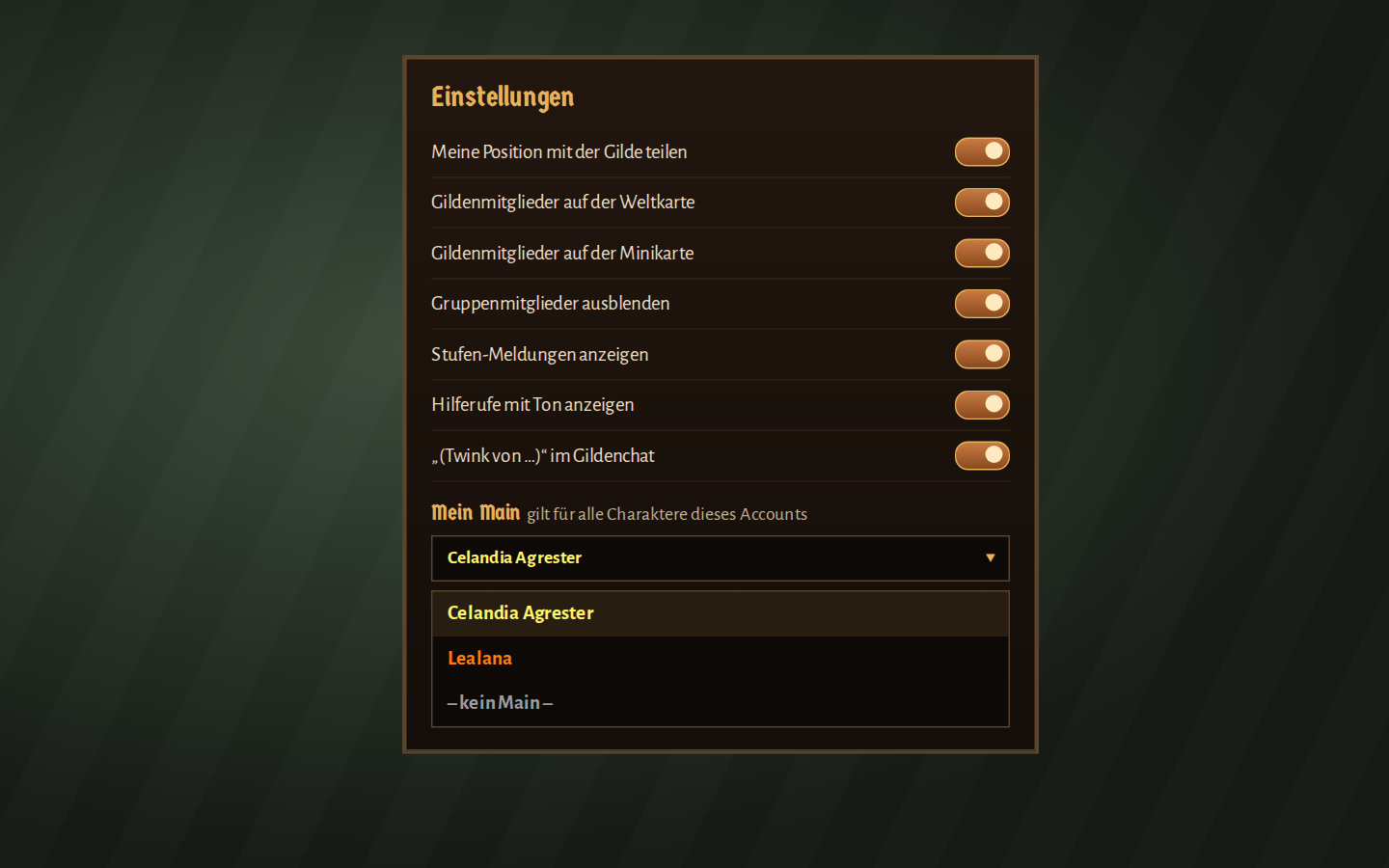
How to get there
- Right-click the crest button at the minimap, or
- type
/sigrid einstellungen, or - open the guild window (
/sigrid) and click the "Einstellungen" tab at the top.
The menu on the left has the pages Karte (map), Meldungen & Töne (notices & sounds), Main & Chat, Gemeinschaft (community), Darstellung (layout), Offiziere (officers – only visible to officers) and Über (about). Switches take effect immediately.
Tip: Hover over a switch – many have a tooltip explaining exactly what happens.
Settings apply to all characters on your account. Exception: notice positions can be per character (see Darstellung).
Karte (map)
| Setting | Default | What it does |
|---|---|---|
| Meine Position mit der Gilde teilen (share my position with the guild) | on | Off: others do not see you on the map and your zone is hidden. You are still listed in the guild window with level and class, but marked "Position verborgen" (position hidden). |
| Gildenmitglieder auf der Weltkarte (guild members on the world map) | on | Other members' dots on the world map. Calls for help, meeting points, campfires and gathering spots stay visible anyway. |
| Gildenmitglieder auf der Minikarte (guild members on the minimap) | on | The addon's icons on the minimap. Note: switching this off hides all addon icons on the minimap, including calls for help, meeting points, campfires and gathering spots. |
| Zeigen, wenn ich tot bin (show when I'm dead) | on | The guild sees "tot" (dead) or "Geist" (ghost) in the member list and a skull on the map. Addons are not allowed to read actual health values in WoW: Forever. |
| Gruppenmitglieder ausblenden (hide group members) | on | WoW already shows your party/raid members on the map, so the addon does not add a second dot. Calls for help and meeting points always stay visible. |
Meldungen & Töne (notices & sounds)
| Setting | Default | What it does |
|---|---|---|
| Stufen-Meldungen anzeigen (show level-ups) | on | A notice when a guild member levels up. |
| Hilferufe anzeigen (show calls for help) | on | Notice, chat line and sound for a call for help. The red cross on the map is always shown. |
| Gilden-Erfolge anzeigen (show guild achievements) | on | New mount, epic item or profession mastered – click to congratulate. |
| Gilden-Jubiläen anzeigen (show guild anniversaries) | on | "One year in the guild" – on the day someone joined. |
| Wochen-Statistik am Montag (weekly stats on Monday) | on | A short fun summary of last week. |
| „Gilde kann herstellen“ in Tooltips ("guild can craft" in tooltips) | on | Item tooltips list who in the guild can craft that item (off during combat). |
Below that you pick the sounds (Töne) for four events. ▶ plays a preview.
| Event | Default sound | When it plays |
|---|---|---|
| Hilferuf (call for help) | Schlachtzugswarnung (raid warning) | new call for help |
| Ansage (announcement) | Bereitschaftscheck (ready check) | new officer announcement |
| Stufenaufstieg (level-up) | Quest abgeschlossen (quest complete) | level-up, guild achievement, anniversary, someone joins your group search, you become a mentor |
| Stufe 60 (level 60) | Stufenaufstieg-Fanfare (level-up fanfare) | level 60, boss kill celebration, bounty completed, treasure found |
Only sounds that come with WoW are offered: raid warning, ready check, quest complete, level-up fanfare, whisper, group invite, battleground ready, alarm clock – or "Aus" (off).
| Setting | Default | What it does |
|---|---|---|
| Alle Addon-Töne aus (all addon sounds off) | off | Mutes every sound of this addon (including the treasure compass ping). Otherwise volume follows WoW's "Effects" setting. |
Main & Chat
- Mein Main (my main): a drop-down with your own characters. The addon knows every character you have logged in with while the addon was active; if one is missing, log in with it once. Applies to all characters on the account. "– kein Main –" (no main) clears it.
- Nicht in der Liste? Namen eintippen (not listed? type the name): a text field plus "Speichern" (save) if you prefer to type the name.
- „(Twink von …)“ im Gildenchat (default: on): messages from alts in guild chat get a prefix saying whose alt they are.
More: Main / alt.
Gemeinschaft (community)
| Setting | Default | What it does |
|---|---|---|
| Gruppensuchen einblenden (show group searches) | on | A notice when a guild member is looking for players. |
| Bosskill-Feier (boss kill celebration) | on | A notice when a raid boss dies in a guild raid. |
| Konfetti (confetti) | on | Short confetti shower for boss kills, a completed bounty and a found treasure. "Konfetti testen" shows it right away. |
| Neue Lagerfeuer melden (report new campfires) | on | A notice when someone shares their campfire. |
| Beim eigenen Lagerfeuer fragen (ask for my own campfire) | on | When you build a campfire in game, the addon asks whether the guild should see it. |
Below is the TrueFotoMode section:
| Setting | Default | What it does |
|---|---|---|
| Zweite Stufe mit allen Namen (second stage with all names) | on | Off: Alt+F12 only toggles between "without names" and off. |
The buttons "Ohne Namen" (without names) and "Mit Namen" (with names) start the mode directly. More: TrueFotoMode.
Darstellung (layout)
- Einblendungen verschieben (move notices): starts move mode (see Announcements & notices).
- Nur für diesen Charakter (only for this character, default off): on – positions and sizes apply only to this character; off – the shared setting of all characters applies.
- Zurücksetzen (reset): all notices and the guild window back to their default spots.
Offiziere (officers)
Only officers see this page. It is explained on For officers.
Über (about)
Addon version, the most important commands and the button "Tutorial erneut starten" (restart tutorial).
Settings found elsewhere
- Gathering map: its own switches under Gemeinschaft → Sammelkarte and on the button on the world map (see Gathering map).
- Group finder: the checkbox "Neue Suchen anderer einblenden" on the group finder page is the same setting as "Gruppensuchen einblenden".
- Treasure compass: right-click toggles its sound (see Treasure hunt).
- Move mode: "Raster anzeigen" (show grid, off) and "Einrasten" (snap, on).
Found a bug or have an idea? Report it here (English is fine)