
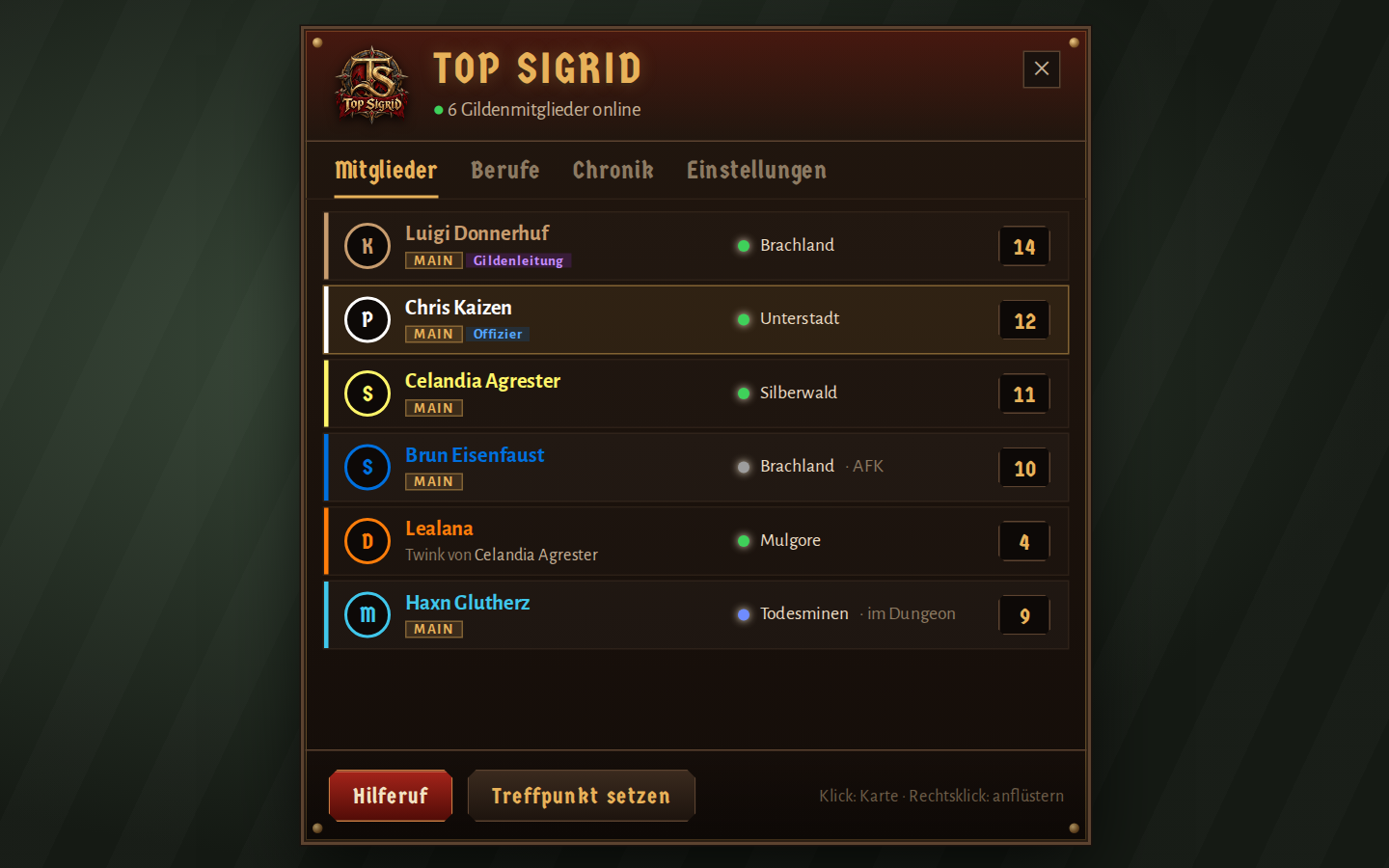
The guild window lists every guild member with the addon who is online right now: class, main or alt, rank, zone, AFK or in a dungeon. It is also the way into all other features.
Opening it
- Type
/sigrid, or - left-click the crest button at the minimap.
/sigrid again or Esc closes it. Grab the window anywhere on an empty spot to move it – it remembers its position.
The header shows how many guild members with the addon are online. Below are the tabs: Mitglieder (members), Berufe (professions), Chronik (chronicle), Gemeinschaft (community) and Einstellungen (settings). Next time the window opens on the tab you used last.
"Mitglieder" tab (members)
Each row is a guild member with the addon:
- Star on the left: favourite. Click it to make someone a favourite – favourites are always at the top, even when they are online on an alt (the star applies to the main and all their alts).
- Class icon and name in class colour. After it, if any: "Main: …" for alts, the rank for officers (coloured) and their first badge.
- Level in the shield.
- Dot and zone: green = out and about; plus "im Dungeon" (in a dungeon), "AFK", "beschäftigt" (busy/DND), "tot" (dead) or "Geist" (ghost). "• hier" (here) means the same zone as you. "Position verborgen" (position hidden) means the person doesn't share their position.
Search and sort
- Typing in the search field filters instantly by name, zone, class or main. Class names are matched in German, as the game shows them.
- "Portal" (or anything starting with "port") shows only mages who can open portals. "Beschwören" (summon) shows warlocks with Ritual of Summoning.
- Click NAME, STUFE (level) or GEBIET (zone) to sort; click again to reverse. When sorting by zone, your own zone comes first.
- Esc in the search field clears it. The mouse wheel scrolls.
Clicking
- Left-click a name to open the world map where that person is.
- Right-click prepares a whisper. For mages it already says "Hallo! Kannst du mir ein Portal machen?" (can you make me a portal?), for warlocks "Hallo! Kannst du mich beschwören?" (can you summon me?). Nothing is sent until you press Enter.
Tooltip
Hovering over a name shows: level and class, zone, "Twink von …" (alt of …), rank, dead/ghost, Ruhestein (hearthstone location), "In der Gilde seit …" (in the guild since …), portals or "Kann beschwören" (can summon), plus profile, badges and away note from the community tab.
Tip: Profile, badges and away note also appear in the normal unit tooltip when you hover over a guild member in the world (not in combat).
Announcement bar
If there is a current officer announcement (up to 2 hours old), it appears as a blue bar above the search field.
Buttons at the bottom
| Button | Who | Effect |
|---|---|---|
| Hilferuf (call for help) | everyone | opens the input box for a call for help; while one is running the button reads "Hilferuf beenden" (end call) |
| Treffpunkt setzen (set meeting point) | officers | set a meeting point here or on the map; if one exists the button reads "Treffpunkt entfernen" (remove). Greyed out for everyone else. |
| Ansage (announcement) | officers | send an announcement to the guild |
What others need
The window only lists guild members who have the addon and are online. Anyone who sends no sign of life for 60 seconds drops off the list. Hearthstone, portals and join date are sent by that person's own addon.
The other tabs
- Berufe – the profession book
- Chronik – chronicle & guild achievements
- Gemeinschaft – profile, away, badges, group finder, bounty & wish list, treasure hunt, gathering map. A number next to a menu item means something is open there (e.g. open group searches).
- Einstellungen – see Settings
Found a bug or have an idea? Report it here (English is fine)